The automation stack, end to end.
Three flavors of automated follow-up — intro email, click-to-chat, and digest. Each has a job; each is editable.
01Intro emails
When a lead is captured on a card with intro emails enabled, Branded fires a one-shot intro email synchronously, immediately after the opportunity is created. No cron, no delay. The template uses Odoo's standard mail-template system, with placeholders for the lead's name, the cardholder's name, phone, email, and the card URL.
Intro emails are opt-in per card (toggle Send intro email automatically on the card's form view, in the Lead Collection Form Settings group). When off, leads still land in CRM but no automated reply goes out.
Intro Email is the only automated email path. An earlier version of the addon also had a separate "Leadback automated email" toggle that did essentially the same job with a configurable delay; that toggle was removed because cards with both flags on double-mailed every prospect. If you need a delayed (rather than immediate) follow-up, use Odoo's standard Mail → Marketing automation against the captured lead.
02Click to Chat
Click to Chat (formerly "Instant Lead-Back") shows the lead a panel of tap-to-message buttons immediately after they submit the form. The buttons open the lead's native messaging app pre-filled with a templated message.
- Toggle: Click to Chat in the Click to Chat Settings group on the card form. When on, the rest of the section unlocks.
- Channels: pick any combination of WhatsApp, Viber, Telegram. WhatsApp is auto-selected when you flip the master toggle on (so you don't trip the "pick a channel" validator immediately).
- Message Delay: how long to wait before the messaging links appear (immediate / 1 min / 5 min / 15 min / 1 hour / custom).
- Chat Message Template: a plain-text body with the same placeholder syntax used in intro emails —
{contact_name},{vcard_url},{booking_url}, conditional{if field}…{/if}blocks, and fallback{placeholder|default}.
A common pattern: intro email goes out immediately (the formal touch), and a 5-minute Click to Chat panel surfaces (the informal "let's talk now" touch). Both are opt-in per card.
03Weekly digest emails
Each cardholder can receive a weekly digest summarizing their card's performance: scans, views, leads captured, top-rated reviews. The digest is opt-in and configurable per user.
For administrators, the org-level digest aggregates across all cards your account manages, with leaderboards by lead count and review count. Useful for sales-team standups.
04Editing templates
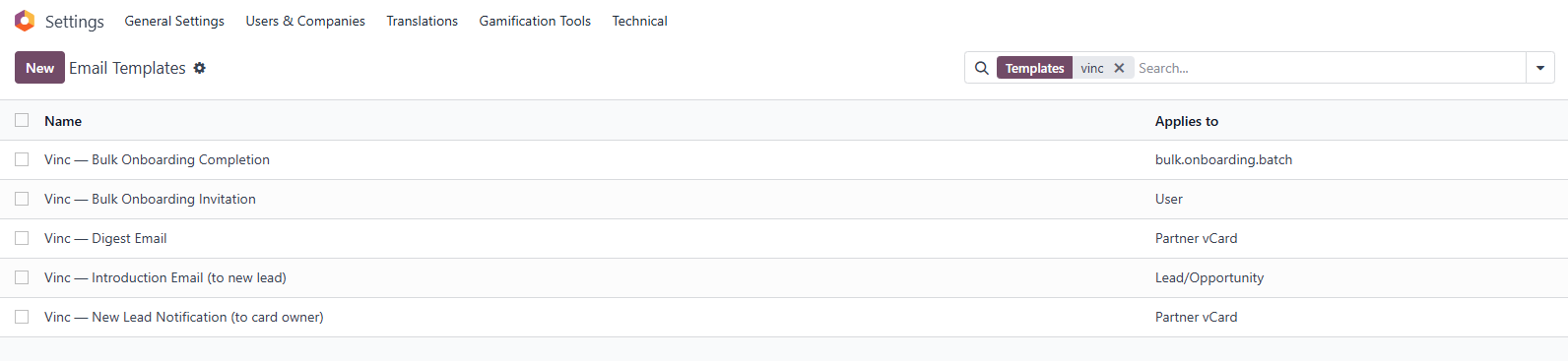
All the addon's mail templates live in Odoo's standard Settings → Technical → Email Templates, prefixed with Vinc — so they cluster alphabetically. Search for Vinc — in the list and you'll see:
- Vinc — Introduction Email (to new lead) — fires when a lead is captured and intro email is enabled on the card.
- Vinc — New Lead Notification (to card owner) — alerts the cardholder when someone submits their form.
- Vinc — Digest Email — the weekly/monthly performance summary.
- Vinc — Bulk Onboarding Invitation — activation email for bulk-onboarded users.
- Vinc — Bulk Onboarding Completion — admin summary after a bulk batch completes.
They're regular Jinja-style templates with full access to the lead, card, and user records. Customize tone, add brand fields, swap CTAs.
Vinc.